import 'package:flutter/material.dart';

class ProductAddScreen extends StatefulWidget {
  const ProductAddScreen({super.key});

  @override
  State<ProductAddScreen> createState() => _ProductAddScreenState();
}

class _ProductAddScreenState extends State<ProductAddScreen> {
  final _formKey = GlobalKey<FormState>();

  bool isSale = false;

  TextEditingController titleTEC = TextEditingController();
  TextEditingController descriptionTEC = TextEditingController();
  TextEditingController priceTEC = TextEditingController();
  TextEditingController stockTEC = TextEditingController();
  TextEditingController salePercentTEC = TextEditingController();

  @override
  Widget build(BuildContext context) {
    return Scaffold(
      appBar: AppBar(
        title: Text("상품 추가"),
        actions: [
          IconButton(
            onPressed: () {},
            icon: Icon(Icons.batch_prediction),
          ),
          IconButton(
            onPressed: () {},
            icon: Icon(Icons.add),
          ),
        ],
      ),
      body: SingleChildScrollView(
        child: Padding(
          padding: const EdgeInsets.all(16.0),
          child: Column(
            crossAxisAlignment: CrossAxisAlignment.start,
            children: [
              Align(
                alignment: Alignment.center,
                child: Container(
                  height: 240,
                  width: 240,
                  decoration: BoxDecoration(
                    color: Colors.grey[200]!,
                    borderRadius: BorderRadius.circular(8),
                    border: Border.all(color: Colors.grey),
                  ),
                  child: Column(
                    mainAxisAlignment: MainAxisAlignment.center,
                    children: [
                      Icon(Icons.add),
                      Text("제품(상품) 이미지 추가"),
                    ],
                  ),
                ),
              ),
              Padding(
                padding: const EdgeInsets.symmetric(vertical: 16),
                child: Text("기본정보"),
              ),
              Form(
                key: _formKey,
                child: Column(
                  children: [
                    TextFormField(
                      controller: titleTEC,
                      decoration: InputDecoration(
                          border: OutlineInputBorder(),
                          labelText: "상품명",
                          hintText: "제품명을 입력하세요"),
                      validator: (value) {
                        if (value == null || value.isEmpty) {
                          return "필수 입력 항목입니다";
                        }
                        return null;
                      },
                    ),
                    SizedBox(
                      height: 16,
                    ),
                    TextFormField(
                      controller: descriptionTEC,
                      decoration: InputDecoration(
                        border: OutlineInputBorder(),
                        labelText: "상품 설명",
                      ),
                      validator: (value) {
                        if (value == null || value.isEmpty) {
                          return "필수 입력 항목입니다";
                        }
                        return null;
                      },
                      maxLength: 254,
                      maxLines: null,
                      keyboardType: TextInputType.multiline,
                    ),
                    SizedBox(
                      height: 16,
                    ),
                    TextFormField(
                      controller: priceTEC,
                      decoration: InputDecoration(
                        border: OutlineInputBorder(),
                        labelText: "가격(단가)",
                        hintText: "1개 가격 입력",
                      ),
                      keyboardType: TextInputType.number,
                      validator: (value) {
                        if (value == null || value.isEmpty) {
                          return "필수 입력 항목입니다";
                        }
                        return null;
                      },
                    ),
                    SizedBox(
                      height: 16,
                    ),
                    TextFormField(
                      controller: stockTEC,
                      decoration: InputDecoration(
                        border: OutlineInputBorder(),
                        labelText: "수량",
                        hintText: "입고 및 재고 수량",
                      ),
                      keyboardType: TextInputType.number,
                      validator: (value) {
                        if (value == null || value.isEmpty) {
                          return "필수 입력 항목입니다";
                        }
                        return null;
                      },
                    ),
                    SizedBox(
                      height: 16,
                    ),
                    SwitchListTile.adaptive(
                      value: isSale,
                      onChanged: (v) {
                        setState(() {
                          isSale = v;
                        });
                      },
                      title: Text("할인여부"),
                    ),
                    if (isSale)
                      TextFormField(
                        controller: salePercentTEC,
                        decoration: InputDecoration(
                          border: OutlineInputBorder(),
                          labelText: "할인율",
                        ),
                        keyboardType: TextInputType.number,
                        validator: (value) {
                          return null;
                        },
                      ),
                    SizedBox(
                      height: 16,
                    ),
                    Text(
                      "카테고리 선택",
                      style: TextStyle(
                        fontWeight: FontWeight.bold,
                        fontSize: 16,
                      ),
                    ),
                    DropdownButton(
                      isExpanded: true,
                      items: [],
                      onChanged: (s) {},
                    ),
                  ],
                ),
              ),
            ],
          ),
        ),
      ),
    );
  }
}
위 내용을 실행하면
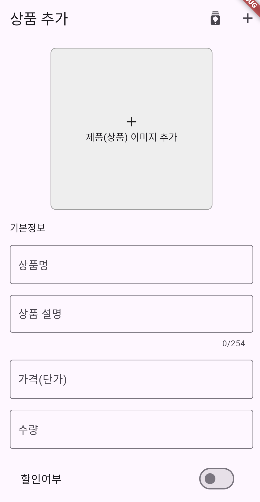
이렇게 나온다.
'Flutter' 카테고리의 다른 글
| firebase - 배달앱(9) 라우터 구현 & 데이터 모델 구현 (0) | 2024.07.14 |
|---|---|
| firebase - 배달앱(6) 제품 상세 화면 기초 (1) | 2024.07.08 |
| firebase - 배달앱(4) 홈화면, 사장님 화면 기초 구성 (0) | 2024.07.07 |
| firebase - 배달앱(3) 회원가입 화면 (0) | 2024.07.07 |
| firebase - 배달앱(1) 프로젝트 설정 (0) | 2024.07.06 |


