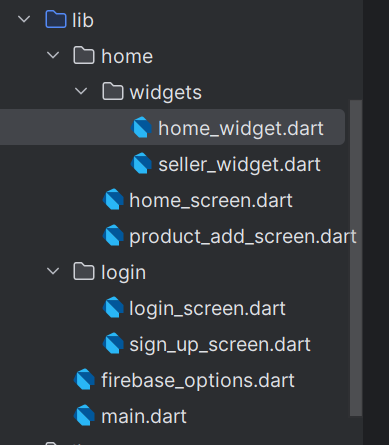
home 폴더 안에 3개의 파일을 넣자. product_add_screen은 무시하자
import 'package:flutter/material.dart';
import 'package:flutter_market/home/widgets/home_widget.dart';
import 'package:flutter_market/home/widgets/seller_widget.dart';

class HomeScreen extends StatefulWidget {
  const HomeScreen({super.key});

  @override
  State<HomeScreen> createState() => _HomeScreenState();
}

class _HomeScreenState extends State<HomeScreen> {
  int _menuIndex = 0;

  @override
  Widget build(BuildContext context) {
    return Scaffold(
      backgroundColor: Colors.grey[100],
      appBar: AppBar(
        title: Text('플러터 마트'),
        centerTitle: true,
        actions: [
          IconButton(
            onPressed: () {},
            icon: Icon(Icons.logout),
          ),
          if (_menuIndex == 0)
            IconButton(
              onPressed: () {},
              icon: Icon(Icons.search),
            ),
        ],
      ),
      body: IndexedStack(
        index: _menuIndex,
        children: [
          HomeWidget(),
          SellerWidget(),
        ],
      ),
      floatingActionButton: switch (_menuIndex) {
        0 => FloatingActionButton(
            onPressed: () {},
            child: const Icon(Icons.shopping_cart_outlined),
          ),
        1 => FloatingActionButton(
            onPressed: () {},
            child: const Icon(Icons.add),
          ),
        _ => Container(),
      },
      bottomNavigationBar: NavigationBar(
        selectedIndex: _menuIndex,
        onDestinationSelected: (idx) {
          setState(() {
            _menuIndex = idx;
          });
        },
        destinations: [
          NavigationDestination(icon: Icon(Icons.store_outlined), label: "홈"),
          NavigationDestination(
              icon: Icon(Icons.storefront), label: "사장님(판매자)"),
        ],
      ),
    );
  }
}
import 'package:flutter/material.dart';

class SellerWidget extends StatefulWidget {
  const SellerWidget({super.key});

  @override
  State<SellerWidget> createState() => _SellerWidgetState();
}

class _SellerWidgetState extends State<SellerWidget> {
  @override
  Widget build(BuildContext context) {
    return Container(
      color: Colors.white,
      padding: EdgeInsets.all(16),
      child: Column(
        crossAxisAlignment: CrossAxisAlignment.start,
        children: [
          SearchBar(),
          SizedBox(),
          ButtonBar(
            children: [
              ElevatedButton(
                onPressed: () {},
                child: Text('카테고리 일괄등록'),
              ),
              ElevatedButton(
                onPressed: () {},
                child: Text('카테고리 등록'),
              ),
            ],
          ),
          Padding(
            padding: const EdgeInsets.symmetric(vertical: 16),
            child: Text(
              '상품목록',
              style: TextStyle(fontWeight: FontWeight.bold, fontSize: 18),
            ),
          ),
          Expanded(child: ListView.builder(itemBuilder: (context, index) {
            return Container(
              height: 120,
              margin: EdgeInsets.only(bottom: 16),
              //color: Colors.orange,
              child: Row(
                children: [
                  Container(
                    width: 120,
                    decoration: BoxDecoration(
                      color: Colors.blue,
                      borderRadius: BorderRadius.circular(8),
                    ),
                  ),
                  Expanded(
                    child: Padding(
                      padding: const EdgeInsets.only(left: 16),
                      child: Column(
                        crossAxisAlignment: CrossAxisAlignment.start,
                        children: [
                          Row(
                            mainAxisAlignment: MainAxisAlignment.spaceBetween,
                            children: [
                              Text(
                                "제품 명",
                                style: TextStyle(
                                  fontWeight: FontWeight.bold,
                                  fontSize: 16,
                                ),
                              ),
                              PopupMenuButton(
                                itemBuilder: (context) => [
                                  PopupMenuItem(
                                    child: Text('리뷰'),
                                  ),
                                  PopupMenuItem(
                                    child: Text('삭제'),
                                  ),
                                ],
                              ),
                            ],
                          ),
                          Text("100000원"),
                          Text("할인 중"),
                          Text("재고수량"),
                        ],
                      ),
                    ),
                  ),
                ],
              ),
            );
          })),
        ],
      ),
    );
  }
}
import 'package:dots_indicator/dots_indicator.dart';
import 'package:flutter/material.dart';

class HomeWidget extends StatefulWidget {
  const HomeWidget({super.key});

  @override
  State<HomeWidget> createState() => _HomeWidgetState();
}

class _HomeWidgetState extends State<HomeWidget> {
  PageController pageController = PageController();
  int bannerIndex = 0;

  @override
  Widget build(BuildContext context) {
    return SingleChildScrollView(
      child: Column(
        children: [
          Container(
            height: 140,
            //color: Colors.blue,
            margin: EdgeInsets.only(bottom: 8),
            child: PageView(
              controller: pageController,
              children: [
                Container(
                  color: Colors.white,
                  padding: EdgeInsets.all(8),
                  child: Image.asset("assets/fastcampus_logo.png"),
                ),
                Container(
                  color: Colors.white,
                  padding: EdgeInsets.all(8),
                  child: Image.asset("assets/fastcampus_logo.png"),
                ),
                Container(
                  color: Colors.white,
                  padding: EdgeInsets.all(8),
                  child: Image.asset("assets/fastcampus_logo.png"),
                ),
              ],
              onPageChanged: (idx) {
                setState(() {
                  bannerIndex = idx;
                });
              },
            ),
          ),
          DotsIndicator(
            dotsCount: 3,
            position: bannerIndex,
          ),
          Container(
            color: Colors.white,
            padding: EdgeInsets.symmetric(horizontal: 16),
            margin: EdgeInsets.symmetric(vertical: 16),
            child: Column(
              children: [
                Row(
                  mainAxisAlignment: MainAxisAlignment.spaceBetween,
                  children: [
                    Text(
                      "카테고리",
                      style: TextStyle(
                        fontWeight: FontWeight.bold,
                        fontSize: 18,
                      ),
                    ),
                    TextButton(
                      onPressed: () {},
                      child: Text('더보기'),
                    ),
                  ],
                ),
                SizedBox(
                  height: 16,
                ),
                Container(
                  height: 200,
                  color: Colors.red,
                ),
              ],
            ),
          ),
          Container(
            margin: EdgeInsets.only(bottom: 24),
            padding: EdgeInsets.only(left: 16, top: 8, bottom: 16),
            color: Colors.white,
            child: Column(
              children: [
                Row(
                  mainAxisAlignment: MainAxisAlignment.spaceBetween,
                  children: [
                    Text(
                      '오늘의 특가',
                      style: TextStyle(
                        fontWeight: FontWeight.bold,
                        fontSize: 18,
                      ),
                    ),
                    TextButton(
                      onPressed: () {},
                      child: Text('더보기'),
                    ),
                  ],
                ),
                Container(
                  height: 240,
                  color: Colors.orange,
                ),
              ],
            ),
          )
        ],
      ),
    );
  }
}
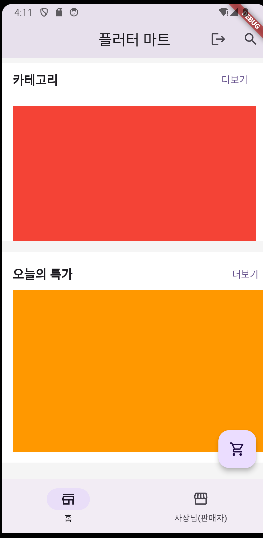
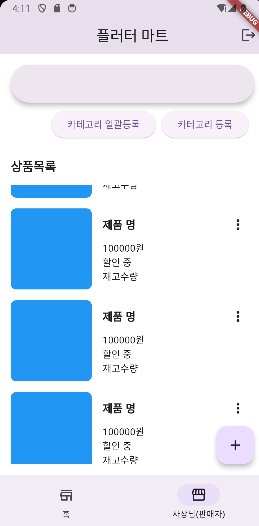
이렇게 3개를 이용해서
다음화면이 만들어진다.
'Flutter' 카테고리의 다른 글
| firebase - 배달앱(6) 제품 상세 화면 기초 (1) | 2024.07.08 |
|---|---|
| firebase - 배달앱(5) 제품 등록 화면 구현 기초 (0) | 2024.07.07 |
| firebase - 배달앱(3) 회원가입 화면 (0) | 2024.07.07 |
| firebase - 배달앱(1) 프로젝트 설정 (0) | 2024.07.06 |
| firebase - realtime database (0) | 2024.07.06 |


