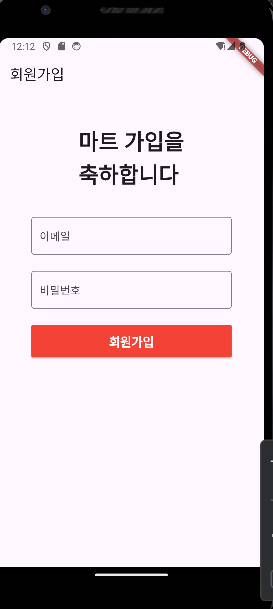
이전에 만든 로그인 화면과 동일하게 만들면 된다.
import 'package:flutter/material.dart';

class SignUpScreen extends StatefulWidget {
  const SignUpScreen({super.key});

  @override
  State<SignUpScreen> createState() => _SignUpScreenState();
}

class _SignUpScreenState extends State<SignUpScreen> {
  final _formKey = GlobalKey<FormState>();
  TextEditingController emailTextController = TextEditingController();
  TextEditingController pwdTextController = TextEditingController();

  @override
  Widget build(BuildContext context) {
    return Scaffold(
      appBar: AppBar(
        title: Text("회원가입"),
      ),
      body: SafeArea(
        child: Padding(
          padding: const EdgeInsets.all(48.0),
          child: Column(
            children: [
              Text(
                "마트 가입을\n축하합니다",
                style: TextStyle(
                  fontSize: 32,
                  fontWeight: FontWeight.bold,
                ),
              ),
              SizedBox(
                height: 42,
              ),
              Form(
                key: _formKey,
                child: Column(
                  children: [
                    TextFormField(
                      controller: emailTextController,
                      decoration: InputDecoration(
                        border: OutlineInputBorder(),
                        labelText: "이메일",
                      ),
                      validator: (value) {
                        if (value == null || value.isEmpty) {
                          return "이메일 주소를 입력하세요";
                        }
                        return null;
                      },
                    ),
                    SizedBox(
                      height: 24,
                    ),
                    TextFormField(
                      controller: pwdTextController,
                      decoration: InputDecoration(
                        border: OutlineInputBorder(),
                        labelText: "비밀번호",
                      ),
                      obscureText: true,
                      validator: (value) {
                        if (value == null || value.isEmpty) {
                          return "비밀번호를 입력하세요";
                        }
                        return null;
                      },
                    ),
                    SizedBox(
                      height: 24,
                    ),
                    MaterialButton(
                      onPressed: () {},
                      height: 48,
                      minWidth: double.infinity,
                      color: Colors.red,
                      child: Text(
                        "회원가입",
                        style: TextStyle(
                            color: Colors.white,
                            fontWeight: FontWeight.bold,
                            fontSize: 18),
                      ),
                    )
                  ],
                ),
              ),
            ],
          ),
        ),
      ),
    );
  }
}
'Flutter' 카테고리의 다른 글
| firebase - 배달앱(5) 제품 등록 화면 구현 기초 (0) | 2024.07.07 |
|---|---|
| firebase - 배달앱(4) 홈화면, 사장님 화면 기초 구성 (0) | 2024.07.07 |
| firebase - 배달앱(1) 프로젝트 설정 (0) | 2024.07.06 |
| firebase - realtime database (0) | 2024.07.06 |
| firebase - firestore (0) | 2024.07.04 |


