go_router를 사용해보자
이전 글에서 코드를 조금 수정했다.
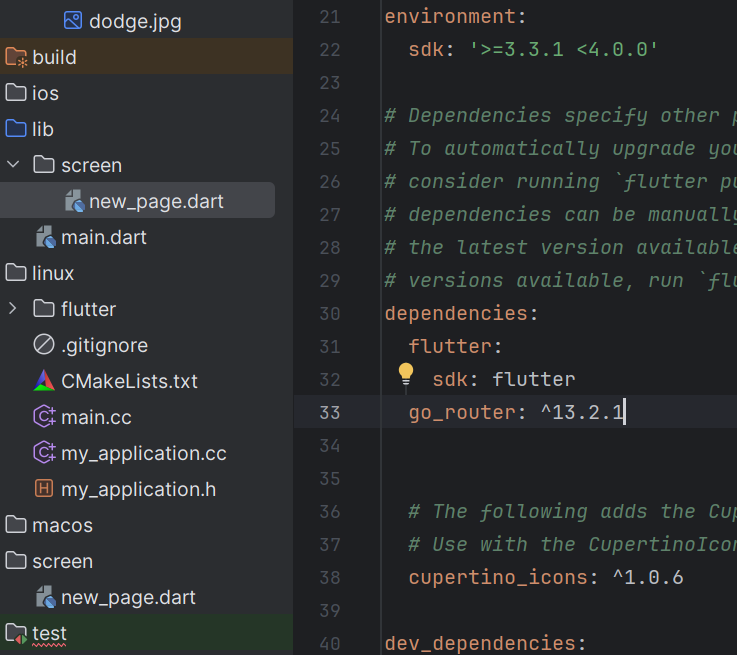
특히 pubspec.yaml에 내용을 추가해야 한다.
내용은 pub.dev에서
go_router 를 검색해서 넣자.
import 'package:flutter/material.dart';
import 'package:go_router/go_router.dart';
import 'package:new_1/screen/new_page.dart';


const assetImagePath = 'assets/images';
const dodgeImage = '$assetImagePath/dodge.jpg';

void main() {
  runApp(
    MaterialApp.router(
      // pubspec.yaml에 go_router를 사용하면 materialapp.router 사용
      routerConfig: GoRouter(
        initialLocation: '/',
        routes: [
          GoRoute(path: '/', name: 'home', builder: (context, _) => const HomeWidget()),
          GoRoute(path: '/new', name: 'new', builder: (context, _) => const NewPage()),
          GoRoute(path: '/new1', name: 'new1', builder: (context, _) => const NewPage2()),

        ]
      ),
    ),
  );
}


class HomeWidget extends StatefulWidget {
  const HomeWidget({super.key});

  @override
  State<HomeWidget> createState() => _HomeWidgetState();
}

class _HomeWidgetState extends State<HomeWidget> {

  late int index;

  @override
  void initState(){
    super.initState();
    index = 0;
  }

  @override
  Widget build(BuildContext context) {
    return Scaffold(
      appBar: AppBar(
        title: Text('flutter 화면 이동하기'),
      ),
      body: Center(
        child: TextButton(
          child: Text('Go to page'),
          onPressed: (){
            /*Navigator.push(context, MaterialPageRoute(builder: (context){
              return const NewPage();
            }));*/
            context.pushNamed('new');
          },
        ),
      ),
    );
  }
}
import 'package:flutter/cupertino.dart';
import 'package:flutter/material.dart';
import 'package:go_router/go_router.dart';

class NewPage extends StatelessWidget {
  const NewPage({super.key});

  @override
  Widget build(BuildContext context) {
    return Scaffold(
      appBar: AppBar(
        title: Text('Welcome to new page'),
      ),
      body: Center(
        child: Column(
          children: [
            TextButton(
              child: Text('Go to Back'),
              onPressed: () => context.pop(),
              /*Navigator.pop(context);  생략*/
            ),
            TextButton(
              child: Text('Go to NewPage2'),
              onPressed: () => context.pushNamed('new1'),
            ),
          ],
        ),

      ),
    );
  }
}


class NewPage2 extends StatelessWidget {
  const NewPage2({super.key});

  @override
  Widget build(BuildContext context) {
    return Scaffold(
      appBar: AppBar(
        title: Text('welcome to page2'),
      ),
      body: Center(
        child: Column(
          mainAxisAlignment: MainAxisAlignment.center,
          mainAxisSize: MainAxisSize.min,
          children: [
            TextButton(
              child: Text('Go to Back'),
              onPressed: (){
                Navigator.pop(context);
              },
            ),
            TextButton(
              child: Text('go to home'),
              onPressed: (){
                /*Navigator.popUntil(context, (route) => route.isFirst);*/
                context.goNamed('home');
              },
            )
          ],
        ),
      ),
    );
  }
}
'Flutter' 카테고리의 다른 글
| 흔들기 앱 만들기 - 패키지 추가하기, 패키지 라이센스 확인하기 (0) | 2024.04.30 |
|---|---|
| 흔들기 앱 만들기 - 앱 아이콘 설정 (0) | 2024.04.30 |
| 플러터 - 위젯이동(기본) (0) | 2024.03.21 |
| 플러터 - 사진 넣기 (0) | 2024.03.21 |
| Flutter - 입력 패턴 (0) | 2024.03.14 |


